Security & Compliance
Q-Day is coming: Here’s how to prepare for the threat of a quantum computer

Sharon Goldberg
Cloudflare
Managing Cloudflare for a big organization can be overwhelming. How do you give users the right blend of autonomy and compliance? How do you make sure that you’re setting yourself up for success around cost, permissions, and reliability? This session gives you the basics for how to set your organization up for success using all the latest innovations from Cloudflare.
0:02Good afternoon everybody. How are we doing? All right. You know, I believe there's no such thing as too small a room and I'm glad you're all here. We've got a tight 20 -minute session here. If you're here today to learn about how to manage Cloudflare at scale, you're in the right room and I appreciate everyone making time right after lunch. I promise we won't put you to sleep here. You know, one of the most common things I hear from enterprise customers is how difficult it is to be a Cloudflare admin. You know, you probably started with one team. And, you know, in most of those cases, you bought one or two products. And I think for a lot of you in the room, you found out that lots and lots of other people across your organization also found Cloudflare useful. And so they come to you and they say, how can I get on the developer platform?
0:50How can I try Zero Trust? How can I enable more security features? And all of the sudden, you, the first person that used Cloudflare, is the person whose full-time job it is to manage everybody else that wants to use Cloudflare. And so I'm here today to give you five different ways that you can manage Cloudflare at scale without losing your control or your sanity. I'll give folks a second to take a photo, because I know these are great little slides to take home.
1:26All right, so step number one, we're going to talk about RBAC and Cloudflare's model for doing fine-grained permissions. So you might be surprised to know that if you go and look at all of the enterprise customers and you count up all the users, 89 % of Cloudflare users in enterprise accounts have a highest privilege that is not admin. That is... very different than the non-enterprise group. But it tells you that RBAC is working. It exists, and it's there and adopted for enterprises.
2:02Now, one of the changes we've made over the last year or so is we've injected a new capability that we call resource granularity permissions. And what that allows you to do is instead of saying you get access to control workers, we say you get access to control these three workers and not the rest of them. them. And this gives you the ability to segment within an account who can control what resources. And for most of you that exist in a single account today, this is something that you should really be looking at as a way to control the blast radius and make sure that folks are not over permissioned by default. We also offer this resource granularity in our API tokens. And so when you're working with agents, you can make sure that those agents only have access.
2:48the resources that they need to get the job done.
2:54The next step that I'm going to recommend that you do is automate your identity using your IDP. So we've got a number of integrations offered across the IDP layer. The first one is SSO. We actually made that self-serve last year. How many of you are already SSO customers? I love to see it. Thank you so much for doing so. Cloudflare's team was like, yep, we got it. You know, this is a big change because you used to have to ask us for permission and now you can do it by yourself and we hope everyone will. You know, SSO is the only way that you can actually manage things like device health checks or enforce pass keys. And so we really recommend that if you control your own email domain that you add SSO today.
3:42The other capabilities that we added around ID integration are all focused on SCIM. Folks that use SCIM, let's see. Okay, smaller group. That's interesting. So SCIM is the system for cross -domain identity management. And it's a mouthful, but what it exists for is syncing the groups that exist in your IDP, your Okta, your Entra, your Ping, whatever the case is, you push those into Cloudflare. And so if you have a developer group or if you have, you know, the front-end developers group, you can push that identity and create the same group within Cloudflare and assign the permissions that make sense Now, when you have a new person that joins the team, you add them to those things in your IDP and they automatically get provisioned in your Cloudflare.
4:30Similarly, if they change teams or leave the organization, their roles get revoked immediately and you've got exactly the permissions that you're looking for. This gives you the ability to... go and layer on the different roles that people need really easily and of course then you can go and audit and see what the permissions are effectively across those organizations now the the next step that you can do once you've got skim is you can actually make privilege access temporary we see folks you know if you use entra as pym for example what that fundamentally is it's a tool that allows you to change your group memberships in your idp dynamically just time. And so you can have a Cloudflare admins group have a governance policy in your external IDP and have users get that access for two hours when they need it. And then they get assigned to that group, the group syncs into Cloudflare, and now they have admin permissions in a controlled, auditable, time -bound way.
5:25This is exactly the sort of thing that we think everybody needs to be thinking about to make sure that you don't have people walking around with super admin tokens when they don't need them on a day. day -to -day basis. All right, practice number three. We call this delegated ownership via multiple accounts. So the first thing I will mention, we actually launched just a few weeks ago the ability for you to self -serve, create up to five additional free accounts. So if you are not on an enterprise plan, you're paying as you go with a credit card, you can go and open five additional accounts. There are no shared subscriptions, so you have to pay for each of those accounts separately but you do this all by yourself you can do this today if you go into the dashboard on your personal account open one for your open source projects if you're an enterprise there's no max on the number of accounts you can get you can share the subscriptions however there's no button to do it you've got to come ask us and so if you've got a salesperson ping them let them know i would like five new accounts please and they will happily walk you through the process and give you as many
6:35Now, the challenge with going to multiple accounts is you can lose visibility. And this is where organizations come in. Organizations actually went generally available just a couple of weeks ago. And I liken the organization's GA not to a butterfly moment. It did not hatch from a cocoon, become a beautiful butterfly. It's a kindergarten graduation, right? This is a product that is maturing, it is growing, it is minimum viable, and we are happy. to call it generally available for enterprises, but it's not very different than it was at the beta. So don't expect a lot of new capabilities, but I'm really excited about the ones we do have. And so the features that you'll find in the organizations are really intended for that multi-account management experience. So first, you get shared org administrators.
7:21So you as the person in the room that manages all of Cloudflare, you probably should have an org super administrator role. So you get visibility. across everything. You also have the ability to get shared configurations for a number of features, and I'll go into that in my demo in just a moment. We also are soon launching additional policies where you can start to restrict what folks can do at the account level. We're adding analytics that go across all of the accounts inside your organization, and of course, audit logs so you can see what's changing. Now, when you think about the accounts, I want you to think about your structure for accounts because this is a place where you can really kind of go sideways. Most folks that we see are organizing accounts by team or project or domain.
8:06So maybe you have a front -end project. Maybe you have a database project, a security team project. Maybe you go a little more fine-grained. It's going to depend on the complexity and the size of your organization, how many you want, but I want you to plan that out now before you go. multi-account, because it's hard to change later. Once you get into that setup, you're kind of there for a bit. And so decide on the model that you like. And then, of course, as I mentioned, teams and user groups and all the things that we do with SCIM, you can still use those to manage those accounts' memberships once you have the account set up. All right. Folks want to see a live demo? Does that sound like fun?
8:54Okay. So my laptop has locked itself. Are we good in the back? Fantastic. Okay. And I can make this just a touch larger. All right. So I have my organization, Southlake Products. And you can see I've got three different accounts here. I've got my data team, my front end team, and my security team. And you can see, you know, very quickly, we can jump over and look at our unified analytics. This is a test organization, so there's not a lot of traffic, but we can quickly get to both the HTTP traffic and the application security analytics so that we can really quickly see at a glance what's happening across the entire portfolio.
9:40We also have the ability, and this is something that I think is really exciting, we have the ability to share configurations from one account to another. you how that works because i think it's really impactful so currently i have uh one of these is in the deleting state that's just because it's i'm demoing so but i have one here which is an identity provider so let's say you've set up uh cloudflare access you use it as your login portal for all of your internal lob services and the thing that you can do is you can actually share that same identity configuration whether that's your octa your entra your github login and you can federate that across all of the accounts inside your organization so from one place you get to manage and update that configuration and it automatically goes to all of the other accounts you can do the same thing with web application firewall rules at the account level and with gateway policies and I think this is a really good thing because you know one of the scenarios that we hear about all the time is folks say look, I've got a bunch of really important account level firewall rules that I apply everywhere.
10:51Let's say you're subject to US export controls. You're a bank or something like that. You need to make sure that you're not getting like folks from North Korea or Iran trying to log into your bank. And the last thing you want to do, if you've got 50 accounts is go manage that list. And then like, you know, the state department puts out a bullet and they say, Hey, we're not friends with these folks anymore. You got to go updated in 50 places. Like no. one wants that job and so let's go and actually see what that looks like to make that happen so i'm going to jump over into one of my accounts this is my security team account and the great thing here is the security team doesn't need access to all of the other accounts the security team can be scoped to just the account that they manage and so i've got my export controls uh rule set here this is already created it's an account level rule set there's a bunch of countries that we check for um and what i can do is if we click on the kebab menu here you can see that we have a share button and i can really quickly just say i want to share this to the data team and i want to share this to the front end team click share deploy and you can see we've got the the green happy bar there and so we know that that just got shared out to all of those other accounts and uh you know in about 30 or 40 seconds when all of the settings sync, that'll show up everywhere, which is exactly what we want.
12:16So, you know, that's a very brief overview of what we've built out with organizations. It's self -serve to onboard. So if you haven't built one, go build one now and sign up for it, claim your organization. We hope that you'll give us feedback and let us know what you love and what you don't love. I will come back to questions. We've only got seven minutes, so we're gonna keep burning here. Let's jump back to the deck, please Thank you so much All right The front monitor we are we are not seeing deck anymore. So that would be great. There it is Okay, so the next frontier that we have for organization once you've gone multi -account once you've gone with organization Once you've set up all of your identity probably thinking boy There's a lot of stuff to look over and it'd be nice to organize it And the way that we want you to organize it is with tags.
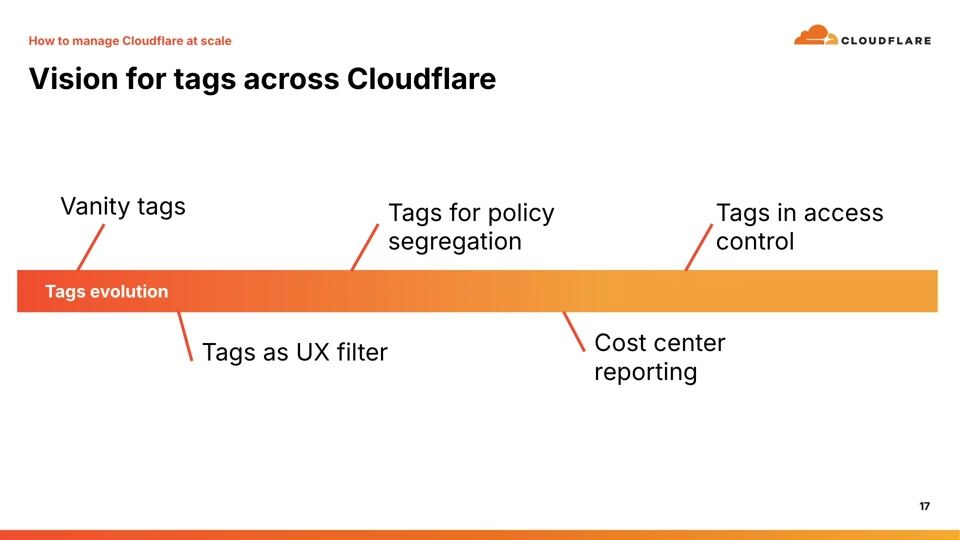
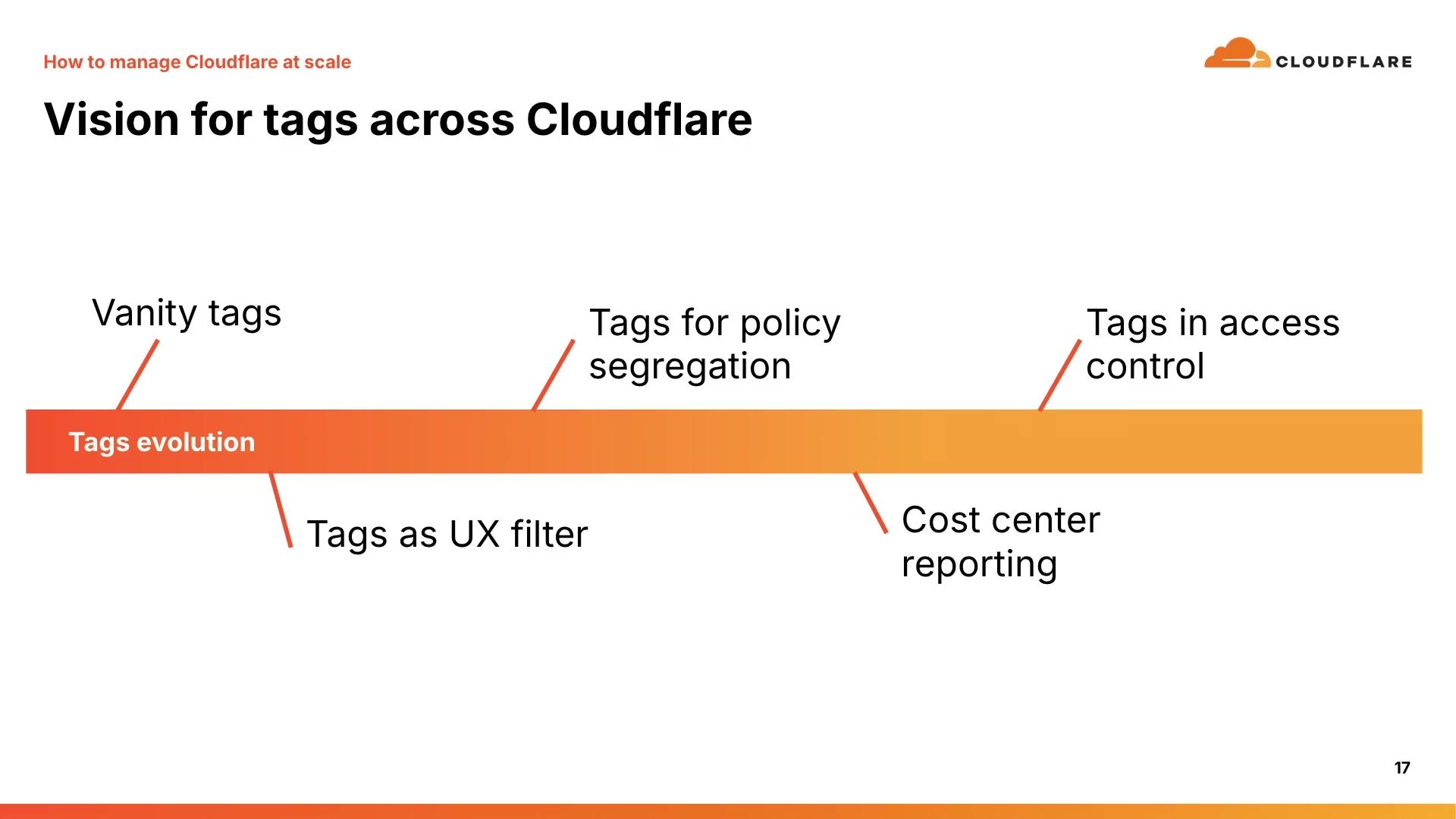
13:09And if you use any other hyperscaler, you're gonna be like, duh. And we've got a vision for tags. I will say we are not all the way down this evolution path. Right now, we are at vanity tags. I call them vanity tags because they look pretty and do nothing. But you as admins in the room know that you're laying these down for the future scenarios that they're gonna unlock. And so, things that are going to start to show up is tags of the UX filter. We're starting to expose tags into the various upstream APIs so that you go to, say, slash workers, you can send it a query parameter that says something like, you know, where tags equals production, and then you get back the list that's scoped to exactly what you want. We're going to be building those integrations in with every one of the APIs to make that a universal capability and build that into the UX.
14:02The other capabilities that we're going to start to layer on as people adopt tags are things like policy segregation. So I showed you how we clicked through those particular accounts as share targets. One of the things that we're going to do is we're going to say, share to accounts that are production. Share to accounts that are, you know, from the engineering team. And we'll have the ability to go and target those based on resource tags. so you can operate on large groups of resources all in one go. And of course, I think the thing that people are the most excited about on this list is the fourth one here, which is cost center reporting. We're working really closely with our billing team. We're going to flow all of these tags into the billing systems so that at the end of the day, if there's another business unit that's using a whole bunch of workers, you can go send them the bill so that your cost center didn't pay for it all.
14:56And so we're really excited about that. that. So one of the other things that we did with tags, and I think this is really important as well, is we designed our tag system as key value pairs. At one of my past jobs, we went through the same thing. We had a flat tag system. We always called it tag soup because what ended up happening inevitably was you'd have every variant of spelling, every variant of punctuation, and it ended up being impossible to govern. And so we built out the key value pair system so that you can organize what are the verbs that you care about, what are the nouns you care about and put them under namespaces. So environment, you can say, I want production staging and test. This is the model that we're trying to build out towards so that you can go and put a structure around what you have for tags.
15:48And we are upgrading legacy APIs that already have a flat tagging mechanism to use the legacy sorry to use the key value pair system and so we've actually delivered tags as the slash tags api which is also available in terraform so you can go tag everything today without waiting on the other apis to upgrade so you want to plan your tags rollout i've got some examples of things you might think about when you're thinking about things that would be good uh categories maybe the owner you want to look at the you know the vp that's accountable for it. You want to look at the lifecycle stage. You want to look at maybe the data category. Is this confidential? Is this something that's, you know, for open source? But think about those sorts of things and plan your rollout. Now is the time. They don't show up anywhere. And so you get your space to go and plan these before they show up everywhere else. All right.
16:39The last practice that I want to talk about is probably the most controversial in the room. Do we have any Terraform fans in the room. Okay, okay, good, good. You know, I get mixed reactions on Terraform. Some people love it, some people hate it, but we see that most big enterprises, Cloudflare included, use Terraform to manage important state. If you've not used Terraform with Cloudflare before, we have a tool for you. It's okay. You can go and run our CF Terraforming tool. It calls the public API. It downloads the state for your existing account. zones, rule sets, and it creates conformant terraform. And so you can go and check that into your GitHub repo and start using config as code without changing a thing.
17:34And when you think about how you're going to actually roll this out, I think the most important thing to plan for when you go to a terraform migration is what's my governance model on this? Who gets to approve the changes? Am I using Code owners, am I gonna have many repos? Is it one repo per project? So you wanna think about your structure for how you do your Terraform plan, how you do your CICD. This is what gives you the opportunity to make sure that things are really high quality. So as I said, use code owners, organize your approvals. I am quickly running out of time, so I'm gonna summarize. They said lightning talk as advertised. So in summary, if you've got too much access, we've got our back. If you are dealing with manual onboarding, go use SSO and SCIM.
18:19Centralized bottleneck, organizations give you delegated control. If you don't know who owns something, use resource tags. If you've got too much configuration going all over the place and it's unmanaged, go to Terraform. And the great news is you can start on all of these today. I also think it's really important. I'm going to nod to the Cloudflare customer zero team, our internal security team. We use all of these. practices internally, every single one of them. So we know firsthand that they work. They work at scale. And we have no hesitation about recommending all of them. Now, I want to tease a little bit of roadmap because I think it's important that I do so as a product guy. So there's a lot of improvements coming. Organizations are going to come to free customers in next year. We're also working on expanding out our policy engine so you can start to layer policies on from organizations.
19:07We will have additional work. user roles and org user tokens are also coming today. You've got to use your user token. So that concludes our very fast lightning round.
Sharon Goldberg
Cloudflare
Rian van der Merwe
Cloudflare
Ian Kelly, Jake Schaeufele
Cloudflare
Be the first to know when registration opens and the agenda goes live.
---
title: "How to manage Cloudflare at scale without overwhelm"
url: "https://www.cloudflare.com/connect/2026/session/how-to-manage-cloudflare-at-scale-without-overwhelm"
year: 2026
---

# How to manage Cloudflare at scale without overwhelm

[Watch session](https://www.cloudflare.com/connect/2026/session/how-to-manage-cloudflare-at-scale-without-overwhelm)

## Session details

- **Track:** Security & Compliance
- **Topics:** Cloudflare product innovations, Performance & resiliency
- **Solution areas:** Core Platform

## About this session

Managing Cloudflare for a big organization can be overwhelming. How do you give users the right blend of autonomy and compliance? How do you make sure that you’re setting yourself up for success around cost, permissions, and reliability? This session gives you the basics for how to set your organization up for success using all the latest innovations from Cloudflare.

## Speakers

- [Justin Hutchings](https://www.cloudflare.com/connect/speakers/2421463) — Senior Director of Product Management, Cloudflare

## Transcript

[0:02] Good afternoon everybody. How are we doing? All right. You know, I believe there's no such thing as too small a room and I'm glad you're all here. We've got a tight 20 -minute session here. If you're here today to learn about how to manage Cloudflare at scale, you're in the right room and I appreciate everyone making time right after lunch. I promise we won't put you to sleep here. You know, one of the most common things I hear from enterprise customers is how difficult it is to be a Cloudflare admin. You know, you probably started with one team. And, you know, in most of those cases, you bought one or two products. And I think for a lot of you in the room, you found out that lots and lots of other people across your organization also found Cloudflare useful. And so they come to you and they say, how can I get on the developer platform?

[0:50] How can I try Zero Trust? How can I enable more security features? And all of the sudden, you, the first person that used Cloudflare, is the person whose full-time job it is to manage everybody else that wants to use Cloudflare. And so I'm here today to give you five different ways that you can manage Cloudflare at scale without losing your control or your sanity. I'll give folks a second to take a photo, because I know these are great little slides to take home.

[1:26] All right, so step number one, we're going to talk about RBAC and Cloudflare's model for doing fine-grained permissions. So you might be surprised to know that if you go and look at all of the enterprise customers and you count up all the users, 89 % of Cloudflare users in enterprise accounts have a highest privilege that is not admin. That is... very different than the non-enterprise group. But it tells you that RBAC is working. It exists, and it's there and adopted for enterprises.

[2:02] Now, one of the changes we've made over the last year or so is we've injected a new capability that we call resource granularity permissions. And what that allows you to do is instead of saying you get access to control workers, we say you get access to control these three workers and not the rest of them. them. And this gives you the ability to segment within an account who can control what resources. And for most of you that exist in a single account today, this is something that you should really be looking at as a way to control the blast radius and make sure that folks are not over permissioned by default. We also offer this resource granularity in our API tokens. And so when you're working with agents, you can make sure that those agents only have access.

[2:48] the resources that they need to get the job done.

[2:54] The next step that I'm going to recommend that you do is automate your identity using your IDP. So we've got a number of integrations offered across the IDP layer. The first one is SSO. We actually made that self-serve last year. How many of you are already SSO customers? I love to see it. Thank you so much for doing so. Cloudflare's team was like, yep, we got it. You know, this is a big change because you used to have to ask us for permission and now you can do it by yourself and we hope everyone will. You know, SSO is the only way that you can actually manage things like device health checks or enforce pass keys. And so we really recommend that if you control your own email domain that you add SSO today.

[3:42] The other capabilities that we added around ID integration are all focused on SCIM. Folks that use SCIM, let's see. Okay, smaller group. That's interesting. So SCIM is the system for cross -domain identity management. And it's a mouthful, but what it exists for is syncing the groups that exist in your IDP, your Okta, your Entra, your Ping, whatever the case is, you push those into Cloudflare. And so if you have a developer group or if you have, you know, the front-end developers group, you can push that identity and create the same group within Cloudflare and assign the permissions that make sense Now, when you have a new person that joins the team, you add them to those things in your IDP and they automatically get provisioned in your Cloudflare.

[4:30] Similarly, if they change teams or leave the organization, their roles get revoked immediately and you've got exactly the permissions that you're looking for. This gives you the ability to... go and layer on the different roles that people need really easily and of course then you can go and audit and see what the permissions are effectively across those organizations now the the next step that you can do once you've got skim is you can actually make privilege access temporary we see folks you know if you use entra as pym for example what that fundamentally is it's a tool that allows you to change your group memberships in your idp dynamically just time. And so you can have a Cloudflare admins group have a governance policy in your external IDP and have users get that access for two hours when they need it. And then they get assigned to that group, the group syncs into Cloudflare, and now they have admin permissions in a controlled, auditable, time -bound way.

[5:25] This is exactly the sort of thing that we think everybody needs to be thinking about to make sure that you don't have people walking around with super admin tokens when they don't need them on a day. day -to -day basis. All right, practice number three. We call this delegated ownership via multiple accounts. So the first thing I will mention, we actually launched just a few weeks ago the ability for you to self -serve, create up to five additional free accounts. So if you are not on an enterprise plan, you're paying as you go with a credit card, you can go and open five additional accounts. There are no shared subscriptions, so you have to pay for each of those accounts separately but you do this all by yourself you can do this today if you go into the dashboard on your personal account open one for your open source projects if you're an enterprise there's no max on the number of accounts you can get you can share the subscriptions however there's no button to do it you've got to come ask us and so if you've got a salesperson ping them let them know i would like five new accounts please and they will happily walk you through the process and give you as many

[6:35] Now, the challenge with going to multiple accounts is you can lose visibility. And this is where organizations come in. Organizations actually went generally available just a couple of weeks ago. And I liken the organization's GA not to a butterfly moment. It did not hatch from a cocoon, become a beautiful butterfly. It's a kindergarten graduation, right? This is a product that is maturing, it is growing, it is minimum viable, and we are happy. to call it generally available for enterprises, but it's not very different than it was at the beta. So don't expect a lot of new capabilities, but I'm really excited about the ones we do have. And so the features that you'll find in the organizations are really intended for that multi-account management experience. So first, you get shared org administrators.

[7:21] So you as the person in the room that manages all of Cloudflare, you probably should have an org super administrator role. So you get visibility. across everything. You also have the ability to get shared configurations for a number of features, and I'll go into that in my demo in just a moment. We also are soon launching additional policies where you can start to restrict what folks can do at the account level. We're adding analytics that go across all of the accounts inside your organization, and of course, audit logs so you can see what's changing. Now, when you think about the accounts, I want you to think about your structure for accounts because this is a place where you can really kind of go sideways. Most folks that we see are organizing accounts by team or project or domain.

[8:06] So maybe you have a front -end project. Maybe you have a database project, a security team project. Maybe you go a little more fine-grained. It's going to depend on the complexity and the size of your organization, how many you want, but I want you to plan that out now before you go. multi-account, because it's hard to change later. Once you get into that setup, you're kind of there for a bit. And so decide on the model that you like. And then, of course, as I mentioned, teams and user groups and all the things that we do with SCIM, you can still use those to manage those accounts' memberships once you have the account set up. All right. Folks want to see a live demo? Does that sound like fun?

[8:54] Okay. So my laptop has locked itself. Are we good in the back? Fantastic. Okay. And I can make this just a touch larger. All right. So I have my organization, Southlake Products. And you can see I've got three different accounts here. I've got my data team, my front end team, and my security team. And you can see, you know, very quickly, we can jump over and look at our unified analytics. This is a test organization, so there's not a lot of traffic, but we can quickly get to both the HTTP traffic and the application security analytics so that we can really quickly see at a glance what's happening across the entire portfolio.

[9:40] We also have the ability, and this is something that I think is really exciting, we have the ability to share configurations from one account to another. you how that works because i think it's really impactful so currently i have uh one of these is in the deleting state that's just because it's i'm demoing so but i have one here which is an identity provider so let's say you've set up uh cloudflare access you use it as your login portal for all of your internal lob services and the thing that you can do is you can actually share that same identity configuration whether that's your octa your entra your github login and you can federate that across all of the accounts inside your organization so from one place you get to manage and update that configuration and it automatically goes to all of the other accounts you can do the same thing with web application firewall rules at the account level and with gateway policies and I think this is a really good thing because you know one of the scenarios that we hear about all the time is folks say look, I've got a bunch of really important account level firewall rules that I apply everywhere.

[10:51] Let's say you're subject to US export controls. You're a bank or something like that. You need to make sure that you're not getting like folks from North Korea or Iran trying to log into your bank. And the last thing you want to do, if you've got 50 accounts is go manage that list. And then like, you know, the state department puts out a bullet and they say, Hey, we're not friends with these folks anymore. You got to go updated in 50 places. Like no. one wants that job and so let's go and actually see what that looks like to make that happen so i'm going to jump over into one of my accounts this is my security team account and the great thing here is the security team doesn't need access to all of the other accounts the security team can be scoped to just the account that they manage and so i've got my export controls uh rule set here this is already created it's an account level rule set there's a bunch of countries that we check for um and what i can do is if we click on the kebab menu here you can see that we have a share button and i can really quickly just say i want to share this to the data team and i want to share this to the front end team click share deploy and you can see we've got the the green happy bar there and so we know that that just got shared out to all of those other accounts and uh you know in about 30 or 40 seconds when all of the settings sync, that'll show up everywhere, which is exactly what we want.

[12:16] So, you know, that's a very brief overview of what we've built out with organizations. It's self -serve to onboard. So if you haven't built one, go build one now and sign up for it, claim your organization. We hope that you'll give us feedback and let us know what you love and what you don't love. I will come back to questions. We've only got seven minutes, so we're gonna keep burning here. Let's jump back to the deck, please Thank you so much All right The front monitor we are we are not seeing deck anymore. So that would be great. There it is Okay, so the next frontier that we have for organization once you've gone multi -account once you've gone with organization Once you've set up all of your identity probably thinking boy There's a lot of stuff to look over and it'd be nice to organize it And the way that we want you to organize it is with tags.

[13:09] And if you use any other hyperscaler, you're gonna be like, duh. And we've got a vision for tags. I will say we are not all the way down this evolution path. Right now, we are at vanity tags. I call them vanity tags because they look pretty and do nothing. But you as admins in the room know that you're laying these down for the future scenarios that they're gonna unlock. And so, things that are going to start to show up is tags of the UX filter. We're starting to expose tags into the various upstream APIs so that you go to, say, slash workers, you can send it a query parameter that says something like, you know, where tags equals production, and then you get back the list that's scoped to exactly what you want. We're going to be building those integrations in with every one of the APIs to make that a universal capability and build that into the UX.

[14:02] The other capabilities that we're going to start to layer on as people adopt tags are things like policy segregation. So I showed you how we clicked through those particular accounts as share targets. One of the things that we're going to do is we're going to say, share to accounts that are production. Share to accounts that are, you know, from the engineering team. And we'll have the ability to go and target those based on resource tags. so you can operate on large groups of resources all in one go. And of course, I think the thing that people are the most excited about on this list is the fourth one here, which is cost center reporting. We're working really closely with our billing team. We're going to flow all of these tags into the billing systems so that at the end of the day, if there's another business unit that's using a whole bunch of workers, you can go send them the bill so that your cost center didn't pay for it all.

[14:56] And so we're really excited about that. that. So one of the other things that we did with tags, and I think this is really important as well, is we designed our tag system as key value pairs. At one of my past jobs, we went through the same thing. We had a flat tag system. We always called it tag soup because what ended up happening inevitably was you'd have every variant of spelling, every variant of punctuation, and it ended up being impossible to govern. And so we built out the key value pair system so that you can organize what are the verbs that you care about, what are the nouns you care about and put them under namespaces. So environment, you can say, I want production staging and test. This is the model that we're trying to build out towards so that you can go and put a structure around what you have for tags.

[15:48] And we are upgrading legacy APIs that already have a flat tagging mechanism to use the legacy sorry to use the key value pair system and so we've actually delivered tags as the slash tags api which is also available in terraform so you can go tag everything today without waiting on the other apis to upgrade so you want to plan your tags rollout i've got some examples of things you might think about when you're thinking about things that would be good uh categories maybe the owner you want to look at the you know the vp that's accountable for it. You want to look at the lifecycle stage. You want to look at maybe the data category. Is this confidential? Is this something that's, you know, for open source? But think about those sorts of things and plan your rollout. Now is the time. They don't show up anywhere. And so you get your space to go and plan these before they show up everywhere else. All right.

[16:39] The last practice that I want to talk about is probably the most controversial in the room. Do we have any Terraform fans in the room. Okay, okay, good, good. You know, I get mixed reactions on Terraform. Some people love it, some people hate it, but we see that most big enterprises, Cloudflare included, use Terraform to manage important state. If you've not used Terraform with Cloudflare before, we have a tool for you. It's okay. You can go and run our CF Terraforming tool. It calls the public API. It downloads the state for your existing account. zones, rule sets, and it creates conformant terraform. And so you can go and check that into your GitHub repo and start using config as code without changing a thing.

[17:34] And when you think about how you're going to actually roll this out, I think the most important thing to plan for when you go to a terraform migration is what's my governance model on this? Who gets to approve the changes? Am I using Code owners, am I gonna have many repos? Is it one repo per project? So you wanna think about your structure for how you do your Terraform plan, how you do your CICD. This is what gives you the opportunity to make sure that things are really high quality. So as I said, use code owners, organize your approvals. I am quickly running out of time, so I'm gonna summarize. They said lightning talk as advertised. So in summary, if you've got too much access, we've got our back. If you are dealing with manual onboarding, go use SSO and SCIM.

[18:19] Centralized bottleneck, organizations give you delegated control. If you don't know who owns something, use resource tags. If you've got too much configuration going all over the place and it's unmanaged, go to Terraform. And the great news is you can start on all of these today. I also think it's really important. I'm going to nod to the Cloudflare customer zero team, our internal security team. We use all of these. practices internally, every single one of them. So we know firsthand that they work. They work at scale. And we have no hesitation about recommending all of them. Now, I want to tease a little bit of roadmap because I think it's important that I do so as a product guy. So there's a lot of improvements coming. Organizations are going to come to free customers in next year. We're also working on expanding out our policy engine so you can start to layer policies on from organizations.

[19:07] We will have additional work. user roles and org user tokens are also coming today. You've got to use your user token. So that concludes our very fast lightning round.

## Related sessions

- [Q-Day is coming: Here’s how to prepare for the threat of a quantum computer](https://www.cloudflare.com/connect/2026/session/q-day-is-coming-heres-how-to-prepare-for-the-threat-of-a-quantum-computer)
- [Unifying network observability: Logs, traces, and the agents you run](https://www.cloudflare.com/connect/2026/session/unifying-network-observability-logs-traces-and-the-agents-you-run)
- [How to get started on your FedRAMP journey with Cloudflare](https://www.cloudflare.com/connect/2026/session/how-to-get-started-on-your-fedramp-journey-with-cloudflare)

## More from Connect

- [All sessions](https://www.cloudflare.com/connect/)
- [Get notified for Connect 2027](https://www.cloudflare.com/connect#2027)


